• English (US)
  • hello.sans@gmail.com
  • +65 11.188.8888

Simple setup. Powerful impact.

01. Create Your Care Circle

Invite trusted family, caregivers, and supporters. Set permissions and roles.

02. Coordinate Care Through the Dashboard

Post requests, updates, and responsibilities. Everyone sees the same information at the same time.

03. Track Care, Tasks & Expenses

Upload receipts, log activities, and keep everything transparent.

04. Review Reports & Secure Records

Access a time-stamped history of tasks, updates, documents, and decisions.

Step 1

Connect the Care Circle

Families invite trusted members of their care circle into the BridgeLinQ dashboard. This may include family members, caregivers, or others helping support a loved one. The person managing the care circle can control how information is shared, allowing families to keep communication organized while protecting sensitive details when needed. For example:

  • Certain information can be limited to friends or outside caregivers

This gives families flexibility while keeping caregiving organized and visible to the people involved in supporting their loved one.

Step 2

Coordinate Care Through the Dashboard

BridgeLinQ works through a shared dashboard where requests, updates, and responsibilities can be posted for the entire care circle to see. For example:

  • A request can be posted asking who is available to take Dad to a haircut appointment.
  • If Mom has a doctor appointment, family members can see the request and respond if they are available to help.
  • Tasks such as meal preparation, home cleaning, or bathing assistance can also be coordinated.

Everyone in the care circle receives the same information at the same time through dashboard notifications. Even when family members live in different locations, everyone can stay connected and informed.

If no one responds to a request, a follow-up notification can be sent, allowing the requester to make alternate arrangements if needed.

This allows families to coordinate care without needing to contact multiple family members individually or rely on scattered text messages, phone calls, or memory.
Even when family members prefer not to communicate directly with one another, they can still participate in caregiving responsibilities through the shared dashboard.

Care Watch Coordinator (weekly or monthly rotation)

This role helps:

  • Monitor requests and ensure follow-through
  • Confirm appointments and responsibilities
  • Keep communication active
  • Prevent gaps in care

Step 3

Track Expenses and Shared Responsibilities

Caring for aging parents or loved ones often involves shared responsibilities and shared expenses.

BridgeLinQ allows families to upload receipts, track caregiving activities, and document updates so everyone can see how care is being managed. Examples may include:

  • prescriptions
  • groceries for the household
  • transportation costs
  • medical supplies
  • caregiver support expenses

Receipts and expenses can be uploaded to the dashboard so the entire care circle has transparency around caregiving costs.
BridgeLinQ also maintains a record of caregiving updates, tasks, and expenses so families can track participation and involvement over time.
For many families, having this record can help reduce confusion or disagreements about:

  • who helped with care
  • who paid for certain expenses
  • reimbursement discussions
  • estate issues
  • conservatorship situations
  • Medicaid or care expense tracking
  • general family accountability

Step 4

Review Reports, Records & Care History

As care continues, BridgeLinQ securely organizes and stores all activity, updates, and records in one place so families can review, track, and reference important information over time.

The dashboard provides a structured, timestamped history of care, making it easier to understand what has been done, what is ongoing, and what may need attention. This may include:

  • Activity logs showing completed tasks and caregiving actions
  • Timestamped updates and communication history
  • Uploaded documents, records, and important files
  • Voice messages and reminders for easier communication
  • notes related to daily care, routines, or changes in condition

Families can also maintain optional records such as:

  • Home and belongings tracking
  • Important personal information
  • End-of-life preferences or planning details (if and when appropriate)

All information is securely stored and connected within the Family Dashboard, allowing authorized members of the care circle to access what they need, when they need it—without relying on scattered documents or memory.

This creates a reliable, organized record that supports better decision-making, reduces misunderstandings, and helps families stay aligned as care needs evolve.

One Connected System. Two Dashboards. Complete Transparency.

BridgeLinQ 360 connects every part of the caregiving journey — giving families, caregivers, and facilities a shared view of what matters most: care, communication, and safety.

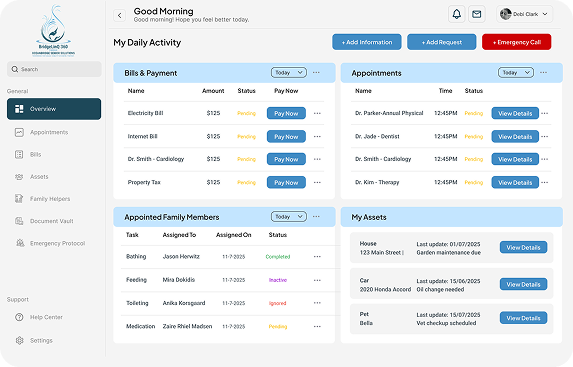
Family Transparency Dashboard

For families and caregivers managing care together—keeping everyone informed, aligned, and accountable.

Highlights:

  • Real-time task logs, caregiver notes, and care updates—so everyone stays informed
  • Appointment scheduling, transportation tracking, and care coordination in one place
  • A shared request board for seniors or disabled loved ones—giving them a direct way to request help
  • A separate shared message and coordination board for the care group—keeping communication organized and clear
  • Clear task tracking—so everyone knows who is responsible and what has been completed
  • Financial tracking with shared visibility into contributions, expenses, and uploaded receipts for full transparency
  • Secure cloud storage for documents, records, and important information—accessible anytime
  • A private vault for sensitive information with controlled or temporary access permissions
  • Customizable alerts and follow-ups—ensuring requests are seen, acknowledged, and acted on
  • Wellness & behavior updates—tracking changes in health, mood, and daily activity
  • Optional household oversight tools—allowing families to track home needs, mail, repairs, and safety checks when additional support or oversight is needed
  • A secure, time-stamped history of tasks, updates, expenses, and decisions for full accountability

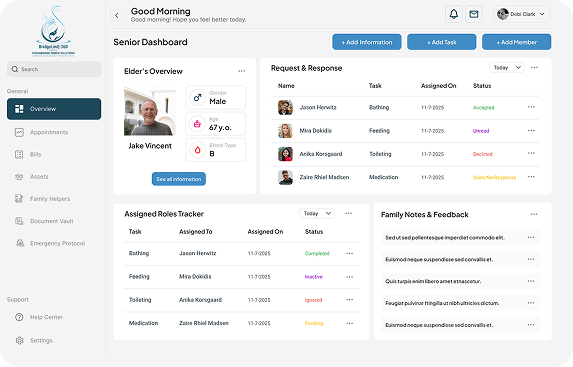
Senior Empowerment Dashboard

A personal dashboard designed to help you stay in control of your care, home, and daily life—especially during unexpected changes or transitions.

Highlights:

  • Request help and connect with trusted support—family, caregivers, or designated contacts
  • Stay informed during hospital visits, transitions, or emergencies—even when communication across care settings is limited
  • Real-time updates, alerts, and shared communication—so nothing is missed
  • Track your home, belongings, mail, repairs, and household needs
  • Coordinate pet care, transportation, and responsibilities—so everything is handled while you’re away
  • Monitor health updates, visits, wellness notes, and daily activity
  • Track bills, income, and care-related expenses—keeping everything clear and organized
  • A secure, time-stamped record of activity, updates, and decisions—accessible anytime
  • A private vault for documents and sensitive information—with controlled access when needed
  • Optional connected to the Family Dashboard—keeping everyone informed while maintaining your independence

Built for Real Life — Not Perfect Situations

Whether families are close, distant, or navigating conflict, BridgeLinQ creates a shared space where care can still happen — clearly, respectfully, and without confusion.

Because caring for someone you love shouldn’t depend on perfect communication — just the willingness to work together.